Last updated · Written and tested by The PhotoRestorationFree team, who build and maintain this tool.
You don't need Photoshop skills to fix old photos any more. The tool above repairs the most common kinds of damage automatically. It is free to try, three photos a day, and the full-size HD version is $2.99 per photo when you want to print or frame it.
Damage the tool fixes
- Scratches and scuffs from years in drawers and wallets.
- Dust, spots and mould specks, common on scans of glass-plate negatives and old prints.
- Creases and fold lines from photos kept in letters and bibles.
- Small tears and missing corners, rebuilt from the surrounding image.
- Fading, yellowing and low contrast from light and age.
- Stains from water, tape and old album glue.
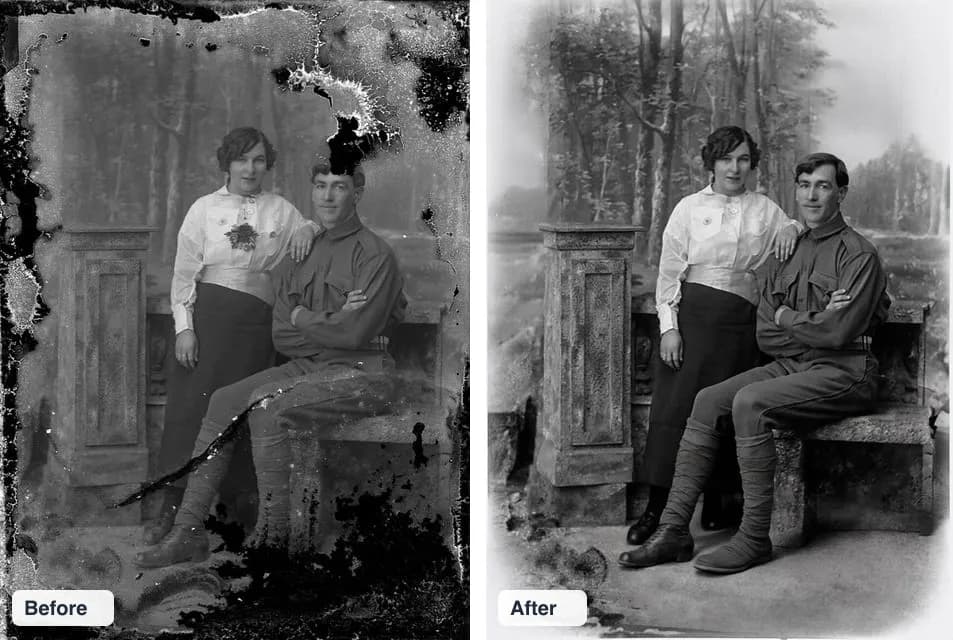
How to fix old photos step by step
- Handle the print gently. Hold it by the edges and brush off dust with a soft, dry brush. Never use water or cleaning sprays.
- Digitize it. Scan at 600 DPI, or photograph it flat in soft daylight. See how to scan old photos.
- Upload the scan above. Your browser removes location data and resizes it first.
- Check the repair. Drag the slider over the worst damage and over every face.
- Save it. Download the free preview, or get HD with face enhancement for prints and frames.
When to use a human retoucher instead
AI is fast and cheap, but it guesses. If a face is mostly missing, if the photo is a legal or historical record, or if you need a specific detail (a medal, a sign, a house number) reconstructed accurately, a professional retoucher who can study other photos is worth the $25 to $150. Many people use AI first to see what is possible, then send only the hardest photos to a human. Read more in AI vs human photo restoration.
Tips for better results
- Upload the largest, sharpest scan you have. More pixels give the AI more to work with.
- Crop away the album page or scanner lid before uploading.
- If one try leaves a mark, restore the photo again: each run is slightly different.
- For black-and-white prints, fix the damage first, then tick Colorize in the HD step.
Fix old photos: FAQ
How do I fix a scratched photo?
Scan or photograph the print, upload it to the tool on this page and wait about 20 seconds. The AI finds scratches and dust and fills them with matching detail. Compare with the slider, then download the free preview or the HD version.
Can a torn photo be repaired?
Yes, if you scan the pieces together. Lay the torn parts on the scanner glass as close as possible, scan them as one image, then upload. The AI blends the tear line. Missing slivers are rebuilt from the surrounding area.
How do I fix a faded or yellowed photo?
Upload it as it is. Restoration rebalances contrast and removes the yellow cast at the same time as it repairs damage. Scanning in color, even for a black-and-white print, keeps more tone for the AI to work with.
Can water-damaged photos be fixed?
Light water stains and tide marks usually clean up well. If the emulsion has peeled off a face, AI can only guess; a human retoucher with other photos of the person will do better.
Will fixing the photo damage the original print?
No. You only upload a scan or phone photo. The print itself is never touched, so keep it safe in an acid-free sleeve.
Should I fix photos stuck to glass or in old albums myself?
Don't pull them off. Photograph or scan them in place, then restore the digital copy. Prints stuck to glass can tear or lose emulsion if forced; a conservator can advise on the physical print.